

Permis Côtier Premium
by Mobibress
Permits Coastal Premium: progress and validate your knowledge. Option coast.

Permis Côtier Premium
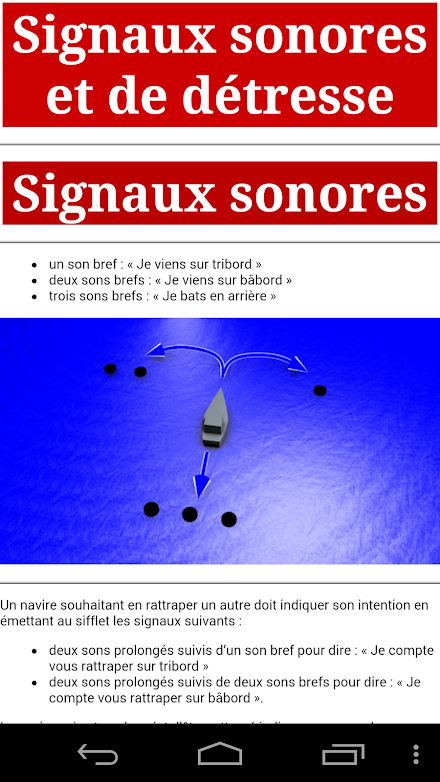
De nouvelles questions sont à venir.Les thèmes suivants sont abordés:- Balisage (Cardinales, feux, latérales...)- Marques et feux des navires- Les signaux- La météo- Cartes marines et symboles- Règles de barre et de route- CRR Radio VHF ASNVous pouvez à tout moment consulter les résultats du dernier questionnaire.Affichez les statistiques par thèmes de vos réponses.Le questionnaire s’accompagne d’illustrations 3D.- La partie documentation contient les sections suivantes: - balisage, marques latérales (régions A et B), chenal préféré (régions A et B) et danger isolé, - carte marine (symboles, sondes, dangers, balisage), - feux et marques de jour, - règles de barre et de route (navire à moteur, navire à voile, véhicule nautiques à moteur VNM, chenal), - signaux sonores (dépassement, visibilité réduite,...) - signaux de détresse, - météo, - plongée, - portuaire, - lexique.Le logiciel ne nécessite pas de connexion internet.
Les questions et illustrations sont installées sur votre mobile.Lapplication "Permis Côtier Premium" par rapport à lapplication "Permis Côtier" :- naffiche pas de publicité,- offre une interface graphique plus aérée,- contient plus de questionnaires.The application is compatible with Android 9.Put all the odds on your side with "Passing Your Coastal Permit" to get the coastal option boat license.The application is also for people wishing to sail with a sea kayak, a canoe and a sailboat because it allows to acquire the essential notions of navigation.Two modes are available to validate your knowledge or progress:- "White Exam" mode: The number of questions and the duration to answer are the same as on the exam.Ergonomics is identical to that of the case used during the exam.At the end of the exam, you will know: the number of correct answers, each question, its correction and a detailed explanation.- "Training" mode: You choose the themes, the number of questions and the time to answer.More than 400 questions with detailed answers.
New questions are coming.The following topics are discussed:- Marking (Cardinals, lights, side ...)- Marks and lights of ships- Signals- Weather- Marine charts and symbols- Bar and road rules- CRR VHF DSC RadioYou can consult the results of the last questionnaire at any time.View the statistics by themes of your answers.The questionnaire is accompanied by 3D illustrations.- The documentation section contains the following sections: - markings, lateral marks (regions A and B), preferred channel (regions A and B) and isolated danger, - nautical chart (symbols, probes, dangers, markup), - lights and daymarks, - rudder and road rules (motor ship, sailing vessel, VNM motor vehicle, channel), - sound signals (overshoot, reduced visibility, ...) - distress signals, - weather, - diving, - port, - lexicon.The software does not require an internet connection.
The questions and illustrations are installed on your mobile.The application "Premium Coastal License" compared to the application "Coastal Permit":- does not display advertising,- offers a more airy graphical interface,- contains more questionnaires.
Version 2.4 : - Correction du nombre de questions pour lexamen blanc.
About Permis Côtier Premium
- Package name (App ID)
- com.mobibress.permiscotierpremium
- Available on
- Google Play
- Price
- $11.99
- Developer
- Mobibress
Looking for the Permis Côtier Premium APK?
The safest way to get Permis Côtier Premium (com.mobibress.permiscotierpremium) on your Android device is to install it directly from Google Play — you'll always get the latest official version, automatic updates, and no risk of modified or infected APK files from third-party sites.

Music Features
Enjoy high-quality music streaming and playback features.
Social Features
Connect and share with friends and the community.
Gaming Features
Enjoy immersive gaming experience with various game modes.
See Permis Côtier Premium in Action


Frequently Asked Questions
Is Permis Côtier Premium free?
Permis Côtier Premium is a paid app — it costs $11.99 on Google Play. You pay once through your Google account and can install it on your Android devices.
How do I install Permis Côtier Premium on Android?
Open Google Play on your Android phone or tablet, search for Permis Côtier Premium by Mobibress or tap the Google Play button on this page, then tap Install. The app downloads and installs automatically.
What is com.mobibress.permiscotierpremium?
com.mobibress.permiscotierpremium is the App ID (package name) of Permis Côtier Premium on Google Play. Every Android app has a unique package name, and it is the safest way to verify you are installing the official app.
Is Permis Côtier Premium safe to download?
Installing Permis Côtier Premium from Google Play is the safest option: you get the official version published by Mobibress, verified by Google Play Protect, with automatic updates. Avoid APK files from unofficial third-party sites.
Get Permis Côtier Premium Today
Permis Côtier Premium for Android — $11.99 on Google Play.
Compatible with Android phones and tablets — available on Google Play.
Ask AI about this app
Get instant answers about features, tips and more from popular AI assistants.